
Do not perform the following instructions without approval from a Pollen Sense Technician, doing so may cause irreversible damage to your sensor. Please review the instructions in their entirety before attempting to operate on the sensor.
In order to properly perform the Controller Board Replacement, you should relocate the sensor to a clean, indoor location where you are free to take it apart and will not lose parts/screws. Do not have the power connected while operating on the sensor. Various hand tools including torx & hex bit screwdrivers, tweezers, and snips are required to complete the following instructions.
Nomenclature
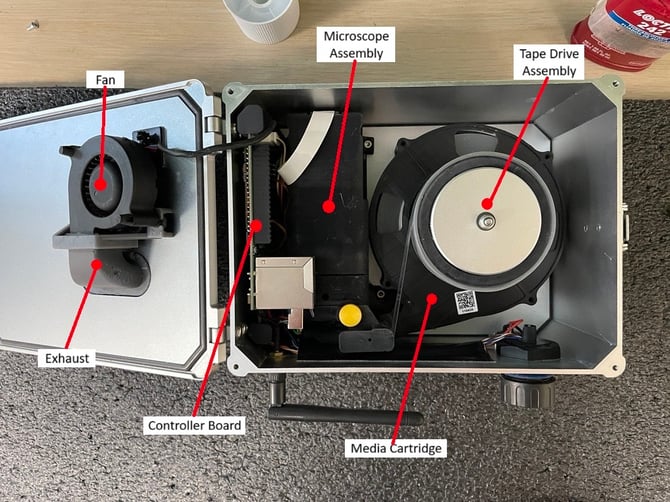
The Controller Board may look slightly different depending on the model of your APS-400 Sensor. This will not cause any issues in the following instructions.
Instructions
-
Open the lid of the sensor and remove the media cartridge.
-
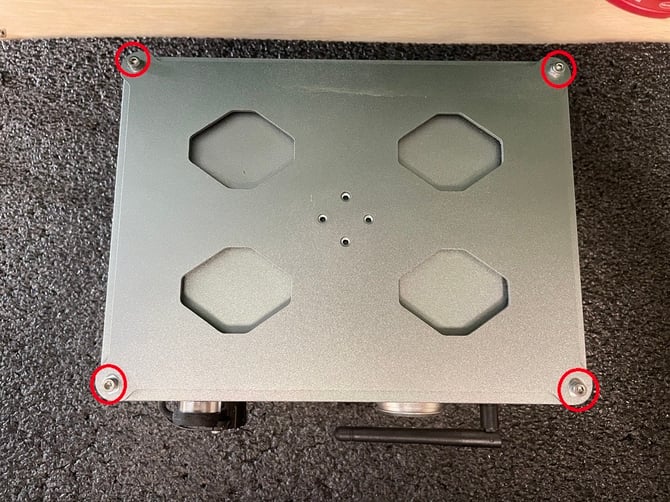
Close the lid and turn the sensor over to reveal 4 screws holding the base plate and enclosure together. Carefully remove these 4 screws, keeping the lid face down.
-
Holding the sensor together, turn it back over so the lid is facing up.
-
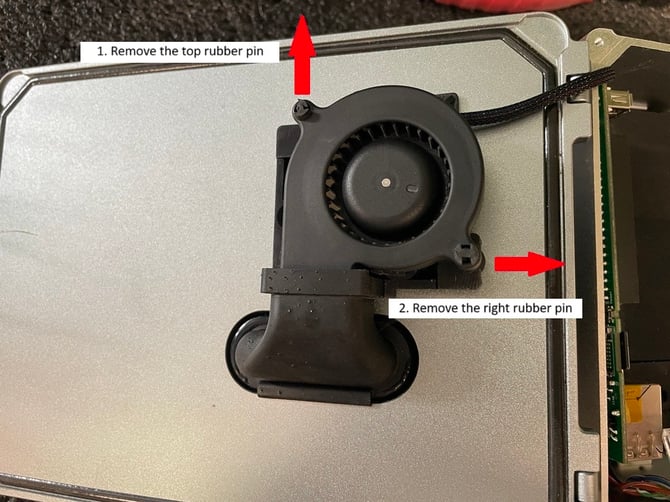
Open the lid and remove the fan from its mount. Do this by pushing the top rubber pin away from the fan exhaust, then pulling out the right rubber pin.
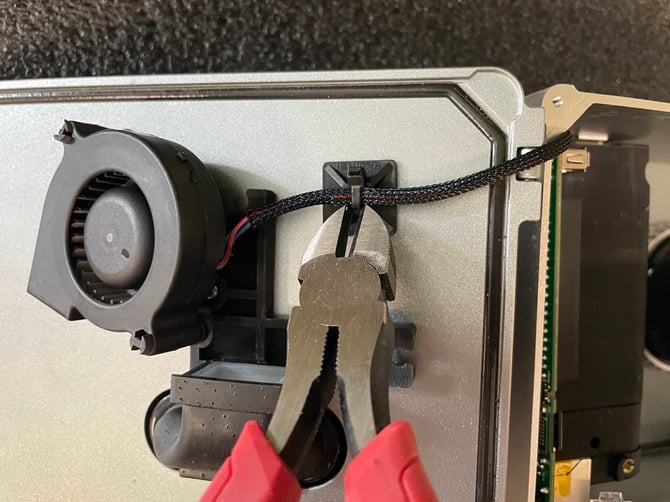
- Using snips, cut and remove the zip tie holding the fan cable to the lid. Be very careful to ensure you do not accidentally cut the fan cable.
-
Place the fan between the Microscope Assembly and Tape Drive Assembly to keep it out of the way for the following steps.
-
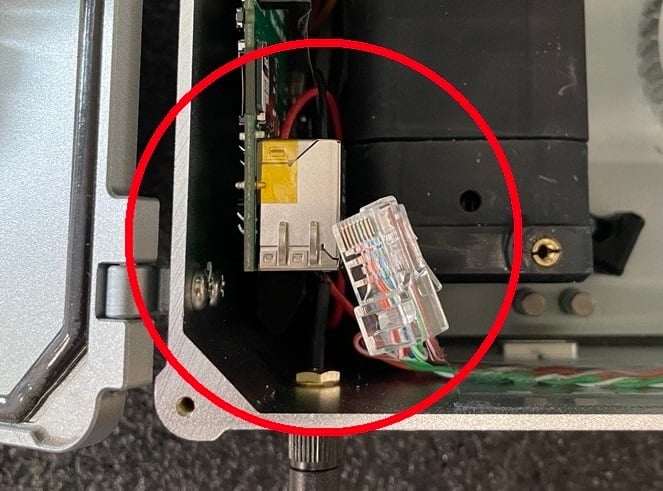
Remove the ethernet cable from the Controller Board. You may have to shift the enclosure around a bit in order to give it enough room to be removed.
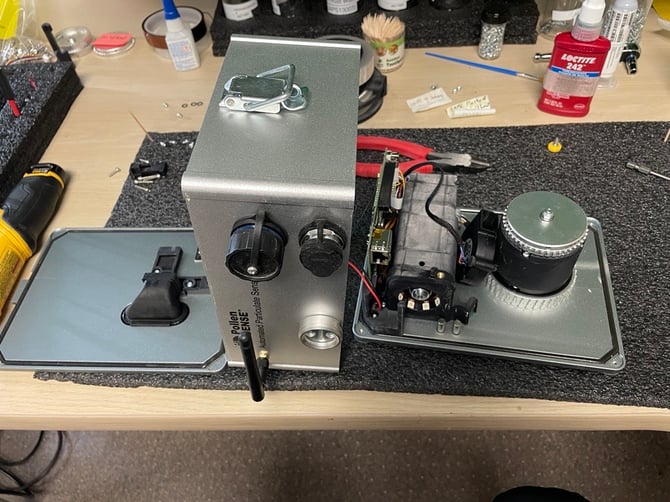
- Slowly lift the enclosure straight up from the base plate and lean it on its side to the left of the base plate. There are still some wires connected to the enclosure, be sure not to damage them when removing.
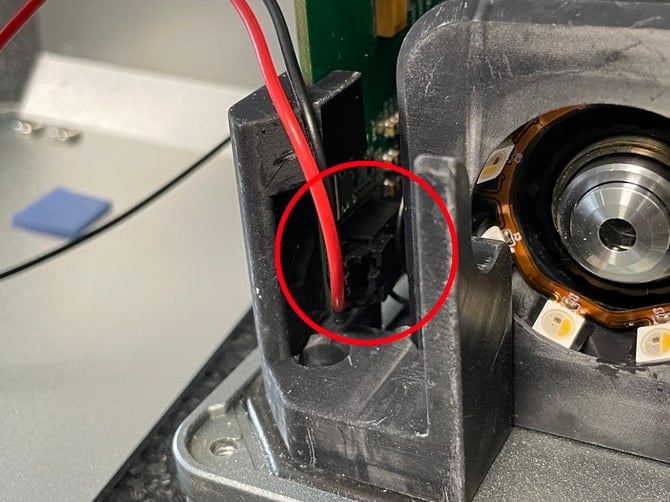
- Remove the power cable from the Controller board.
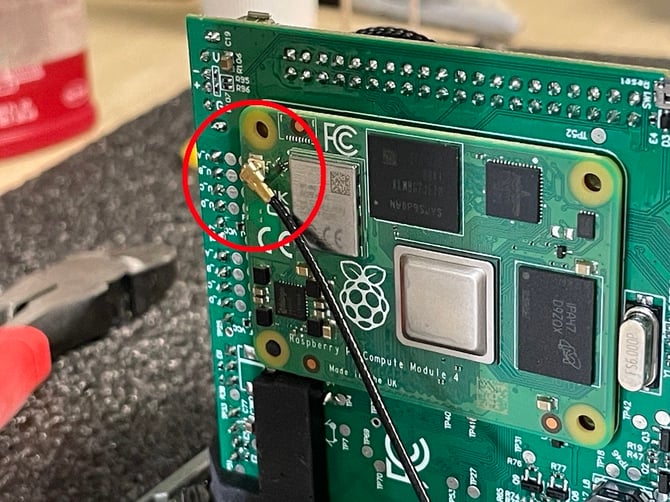
- Remove the antenna cable from the Controller Board.
-
Set aside the lid and enclosure away from the base plate to give yourself more room to continue operating.
-
Remove the Raspberry Pi from the Controller Board. Be very gentle when doing this, the parts holding this together are extremely fragile. It is helpful to use tweezers to pry the Raspberry Pi from behind.
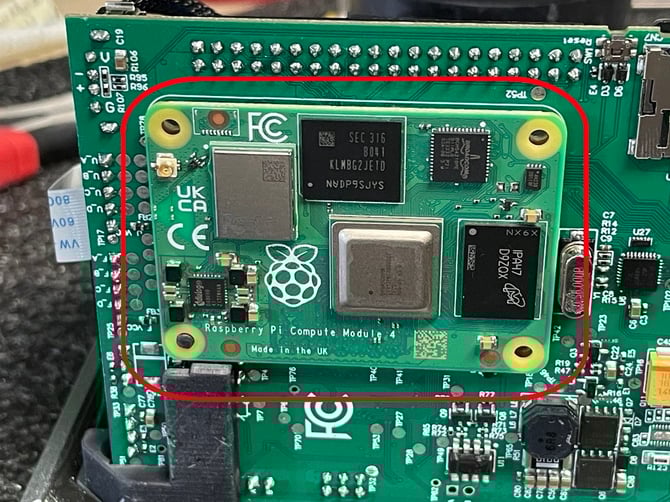
-
Turn the base plate to view the back side of the Microscope Assembly. Take note of how the white cable is installed into the rear of the Microscope Assembly. The two possible orientations are shown below. If this cable is reinstalled improperly in a later step, the sensor will undergo irreversible damage when powered back on.
- Remove the white cable from the Microscope Assembly by first flipping open the black clip, then pulling the cable straight out of the connector.
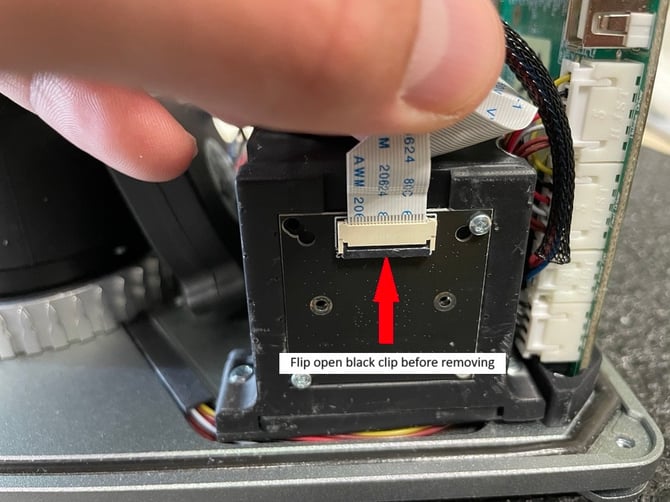
-
Turn the base plate to now view the front of the Microscope Assembly. Remove the screw in the mount holding the Controller Board in place.
-
Remove the board mount.
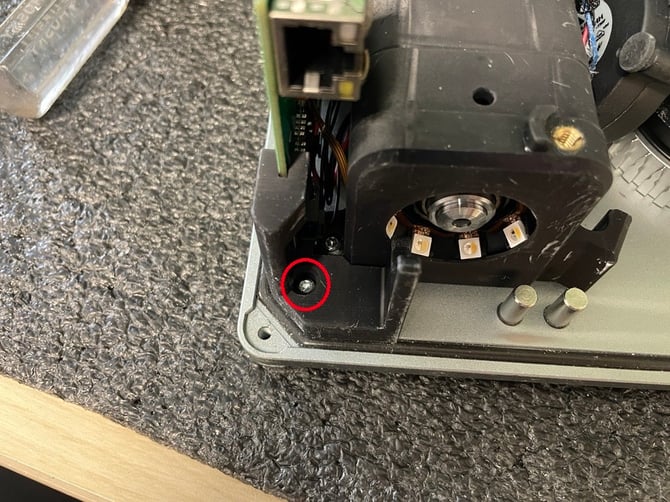
- Remove the Controller Board from the board mount towards the rear of the Microscope Assembly. Do so by gently prying the pin of the board mount out of the Controller Board and lifting it up and to the right of the mount.
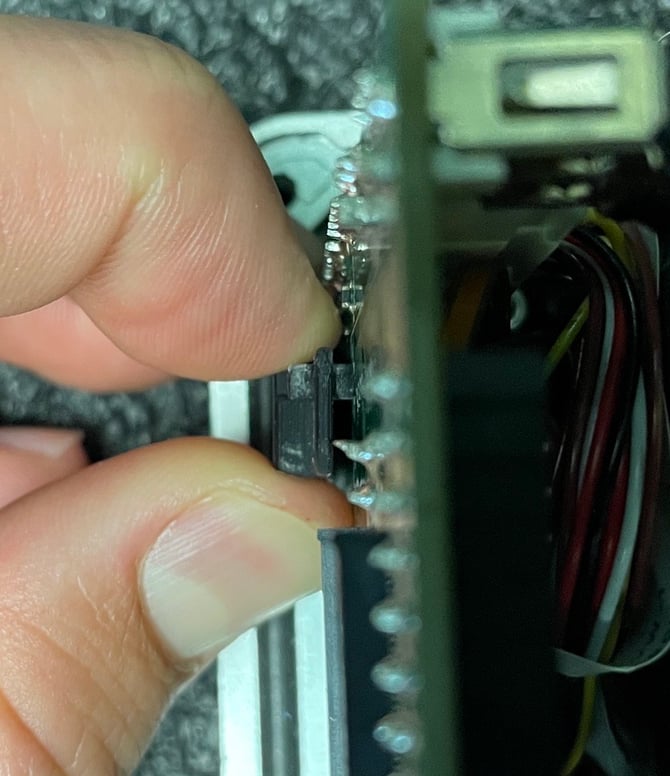
-
Set the Controller Board to the left of the base plate.
-
Remove the board mount towards the rear of the Microscope Assembly and keep the screw.
-
Using the screw saved in the previous step, install the new board mount (shipped with the new Controller Board) in its place towards the rear of the Microscope Assembly.
-
Remove all wire connectors from the Controller Board. Only pull from the connectors, do not pull the wires directly. Some connectors need to have clips opened before you are able to remove the connectors.
-
Remove the SD Card(s) from their slots in the old Controller Board and install them into their identical slots on the new Controller Board. Keep the orientation the same, do not swap locations on the Controller Board with these SD Cards.
-
Discard the old Controller Board.
-
Reconnect all of the connectors to the Controller Board as listed and shown below:
1. LED Ring
2. Microscope Objective Cable
3. Tape Sensor Cable
4. Fan Cable
5. Bottom Motor (with black mark on connector)
6. Top Motor
7. Camera Cable - The brown clip must rest on the blue stripe of the Camera Cable. -
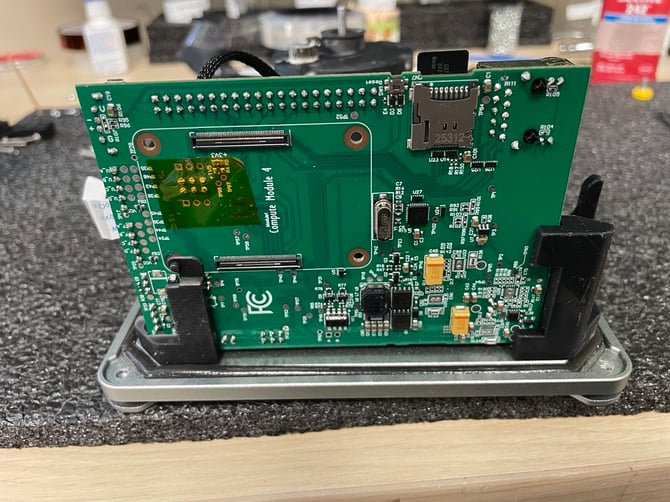
Reinstall the Controller Board into the rear board mount. The pin on the mount must sit in its designated hole on the Controller Board in order to be mounted correctly. Ensure that none of the wires between the Controller Board and Microscope Assembly are being crushed.
-
Reinstall the front board mount removed in step 15.
-
Reinstall the Raspberry Pi onto the Controller Board.
-
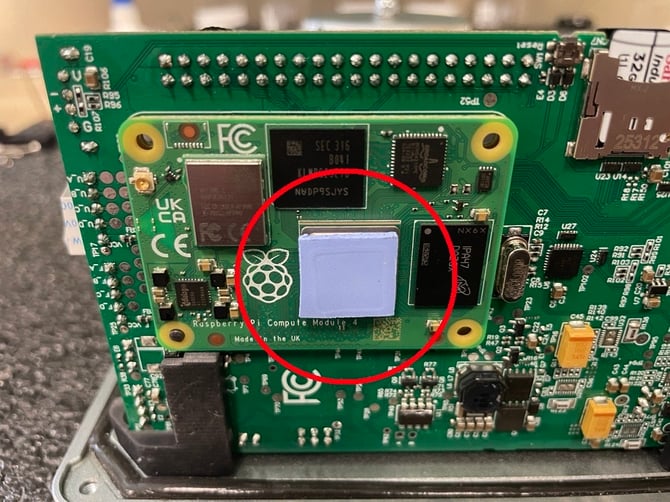
Replace the thermal foam pad onto the CPU of the Raspberry Pi. This foam pad may have been stuck to the side of the enclosure. If it is no longer present, it must be replaced with another thermal foam pad or thermal paste.
-
Reconnect the white cable to the rear of the Microscope Assembly in the same orientation as noted by you in step 13. Be sure to first open the black clip, slide the cable in, then close the black clip. The pins of the cable need to sit evenly inside the connector on the Microscope Assembly.
-
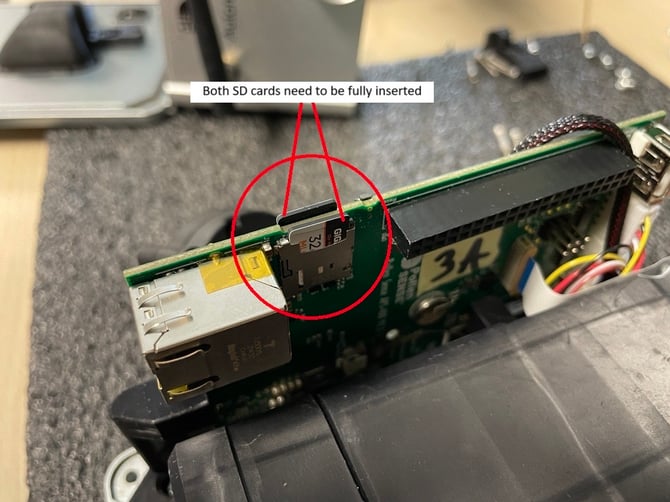
Ensure both micro SD cards are fully installed in the Controller Board, you may need to press them back in.
-
Set the sensor’s Enclosure on its side and to the left of the Base Plate.
-
Attach the power cable to the Controller Board.
- Attach the antenna cable to the Raspberry Pi.
- Lift the Enclosure and gently place it onto the Base Plate. Ensure that all components are within it and that none of the wires are pinched by the walls. View the image below for proper power cable and antenna cable management.
- Reconnect the ethernet cable to the Controller Board.
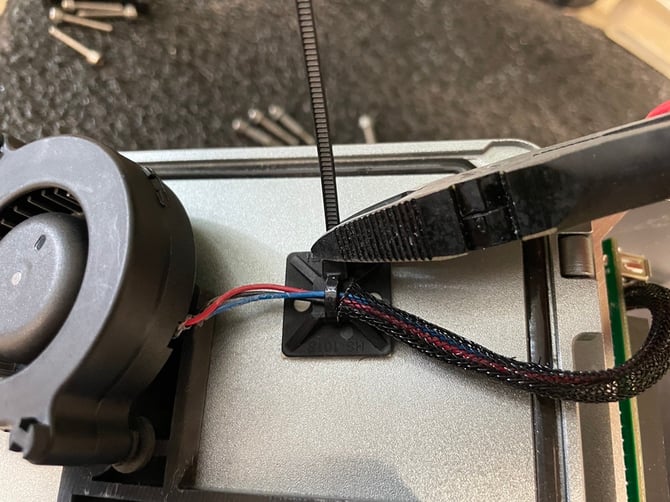
- Zip tie the fan cable to the small clip next to the fan’s mount. Cut away the excess zip tie.
-
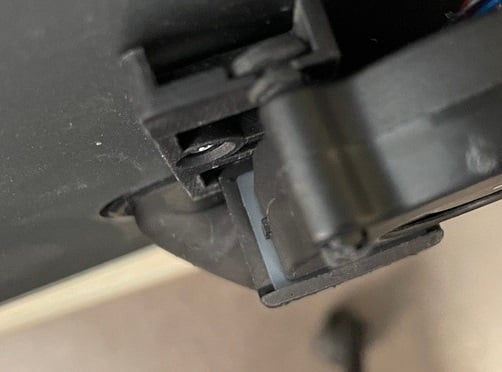
Reinstall the fan into its mount by first inserting the right rubber pin, then rotating the fan until the top rubber pin is in place (step 4 in reverse).
-
Ensure the nozzle of the fan is properly seated in the rubber seal of the fan exhaust.
-
Close the lid of the sensor and carefully turn it over, keeping all the components together.
-
Reinstall the 4 screws removed in step 2. Do so in a crisscross pattern to allow even pressure around the seal of the enclosure.
-
Replace the media cartridge.