
If you are using a partially used cartridge, you will need to take some measurements and make simple calculations. Failure to do so may cause the sensor to inaccurately measure concentration values, leading to inaccurate data. Any notifications related to media cartridge status may also fail to trigger, potentially leading to extended downtime.
Remaining Tape Radius Conversion Tables
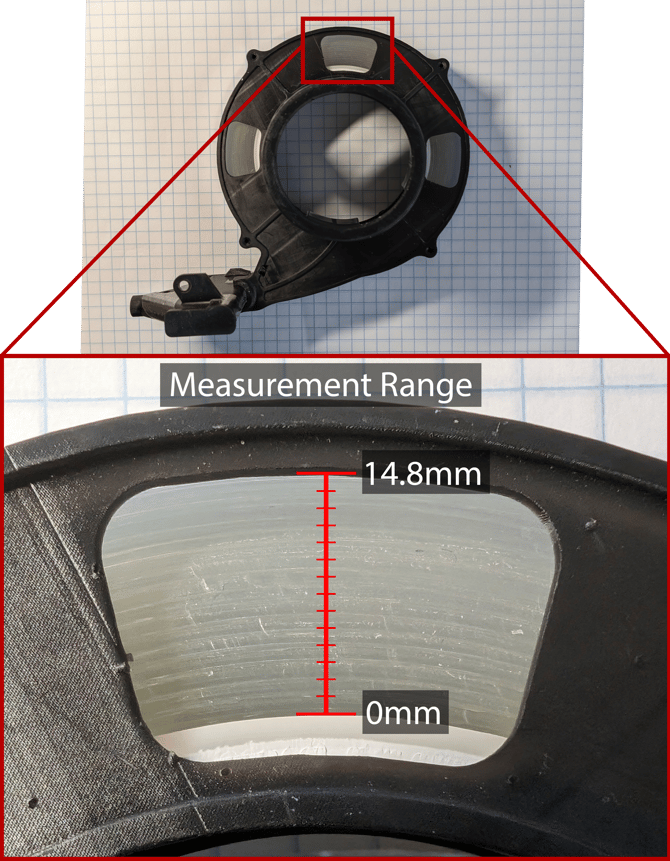
Inches to Remaining Tape %
|
Remaining Tape Radius (in) |
Remaining Percentage |
|
1/32 |
5% |
|
1/16 |
11% |
|
3/32 |
16% |
|
1/8 |
21% |
|
5/32 |
26% |
|
3/16 |
32% |
|
7/32 |
37% |
|
1/4 |
42% |
|
9/32 |
47% |
|
5/16 |
53% |
|
11/32 |
58% |
|
3/8 |
63% |
|
13/32 |
68% |
|
7/16 |
74% |
|
15/32 |
79% |
|
1/2 |
84% |
|
17/32 |
89% |
|
9/16 |
95% |
|
19/32 |
100% |
Millimeters to Remaining Tape %
|
Remaining Tape Radius (mm) |
Remaining Percentage |
|
1 |
7% |
|
2 |
14% |
|
3 |
20% |
|
4 |
27% |
|
5 |
34% |
|
6 |
41% |
|
7 |
47% |
|
8 |
54% |
|
9 |
61% |
|
10 |
68% |
|
11 |
74% |
|
12 |
81% |
|
13 |
88% |
|
14 |
95% |
|
14.8 |
100% |
Instructions on how to install the media cartridge into your sensor can be found at Media Cartridge Installation Guide. After replacing the media cartridge, open the Particle Sense app and navigate to the sensor’s page. Once there, press “Replace Sampling Media” and select the condition of the cartridge based on the tables above.