
This should only be performed when asked to do so by a Pollen Sense Technician
The APS-400 sensor uses a combination of a tape drive and media cartridge to collect air particles and display them in front of its microscope. If the media cartridge is not properly set onto the tape drive assembly, it may result in the Sensor collecting duplicate data (repeatedly capturing the same image as the media will not move correctly).
A possible solution to this problem is to reset the media cartridge onto the motor assembly as follows:
-
Keep the Sensor powered on and open its lid.
-
Examine the media cartridge to make sure that it is seated correctly on the silver gear of the tape drive. Indication of correct positioning of the media cartridge is to partially see the ball detents of the tape drive, as shown in Figure 1 below.
Figure 1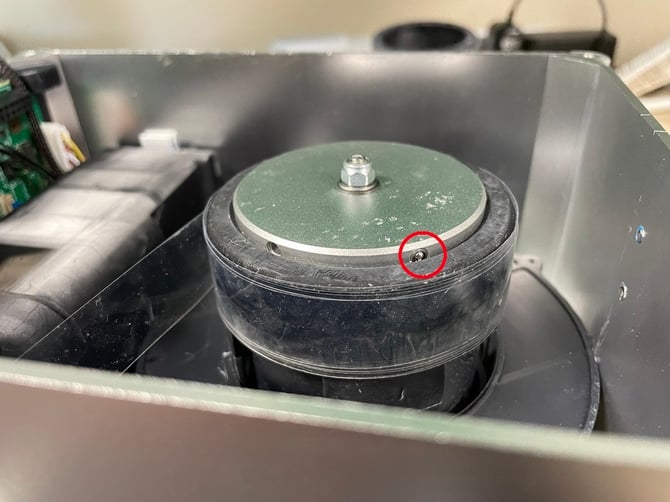
Correct position of media cartridge shown by visibility of ball detent (circled in red)
*If the ball detents are already visible as shown above, refer to the yellow box below -
If the ball detents are not visible, lightly push the spool of the media cartridge (the black, circular piece surrounding the silver gear) further onto the tape drive until it snaps into place. This should not require much force.
-
Close the lid of the Sensor and power cycle it (unplug from power, wait 10 seconds, plug back in).
-
Notify the Pollen Sense Technician with whom you have been in contact. They will continue to monitor the Sensor to ensure that the issue has been resolved.
If the ball detents were visible in step 2 of this document, or if you were unable to push the media cartridge completely onto the motor drive, please notify the Pollen Sense Technician you are in contact with immediately. It is likely that a deeper examination of the Sensor/Media Cartridge will be need to be conducted.